Dealing with Fire (Part 2): How to Respond in a QA Crisis
You are halfway through a sprint demo when a teammate quietly flags something odd in staging. Minutes later, production logs confirm the issue is already live.


A backend service is misrouting user data, checkout failures are rising, and support has not seen it yet, but you know they will soon.
As the engineering or QA leader responsible for the release, you have minutes to act.
This is where QA crisis response frameworks matter. They turn confusion into coordination and help teams move with speed and clarity in high-pressure moments.
Part 1 focused on crisis planning, the safeguards and structures that prevent many incidents before they reach production. But even the best preparation has limits. Eventually, something critical slips through.
Part 2 moves into crisis management, the work that begins when users are affected, and every decision counts. In these situations, how your team responds determines whether the incident is contained quickly or becomes a reputational and financial threat.
The tools you rely on in a live incident come directly from your planning work. Severity levels, escalation paths, on-call rotations, communication templates, and rapid-response test suites all start as preparation.
When a crisis hits, they become the backbone of your response.
Severity Classification & Escalation
In a QA crisis, the first question is always the same: how serious is this? Not every incident deserves an all-hands crisis response, and not every issue can wait until morning.
Most teams use a tiered system; the labels matter less than consistent use, so minor issues stay contained and major ones get immediate attention.
Here is a sample severity framework that QA and engineering teams can adapt in a crisis.
Declaring severity early is essential. It activates the right responders and sets clear expectations for communication and follow-up.
For example, S1 and S2 incidents usually trigger immediate paging and a dedicated channel, while S3 issues can wait for business hours.
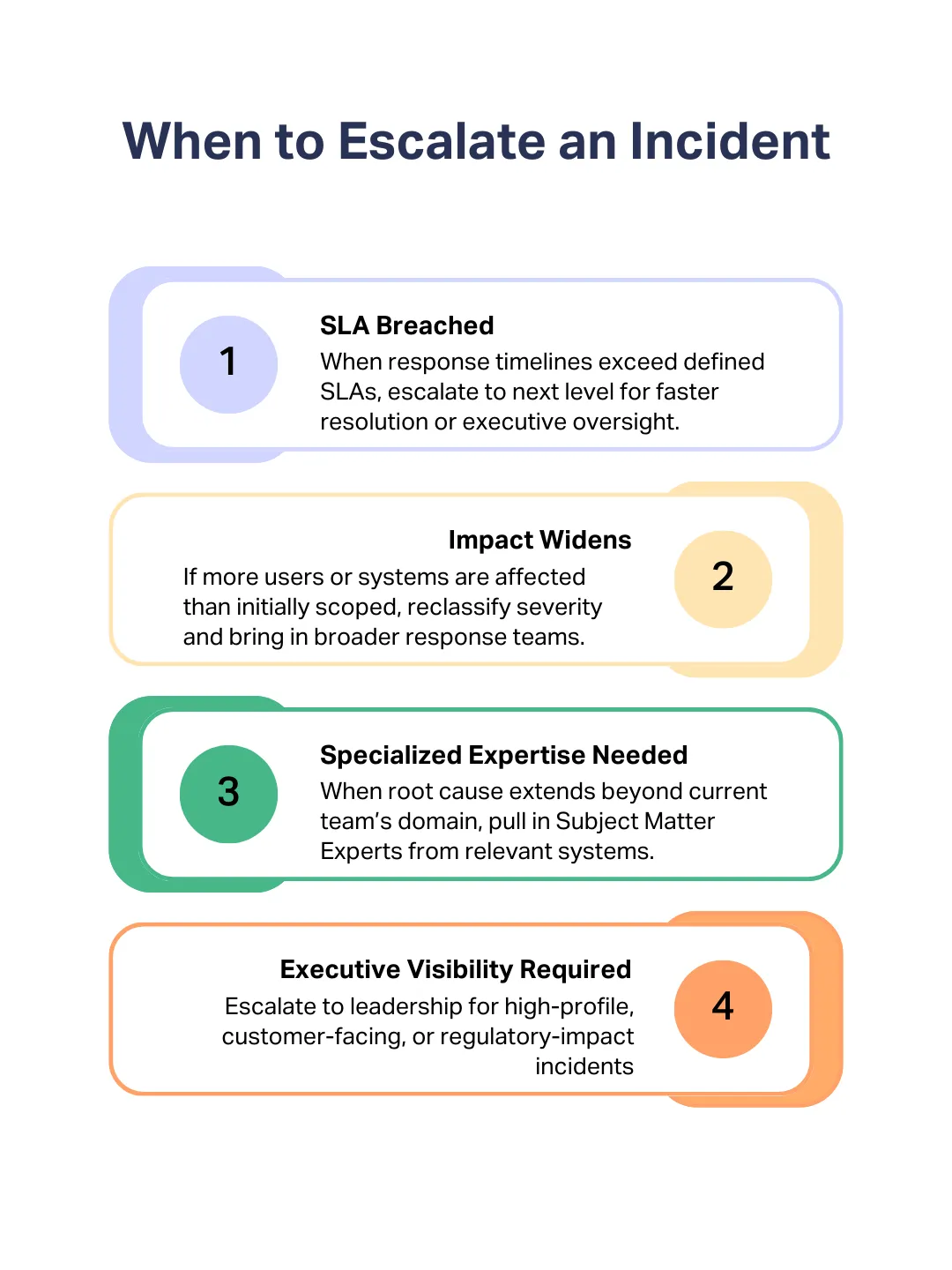
Escalation should be driven by clear triggers, not emotion or volume.
The Incident Command System (Google SRE Model)
When a QA crisis hits, the biggest danger is not the defect itself. It is the confusion that follows. People jump into different channels, decisions stall, and work is duplicated.
This is why many engineering organisations use an Incident Command System, a structured model borrowed from emergency crisis response and widely adopted by Google’s SRE teams.
The aim of ICS is simple: coordinate, communicate, and maintain control during an incident. Key roles in an ICS-based response include:
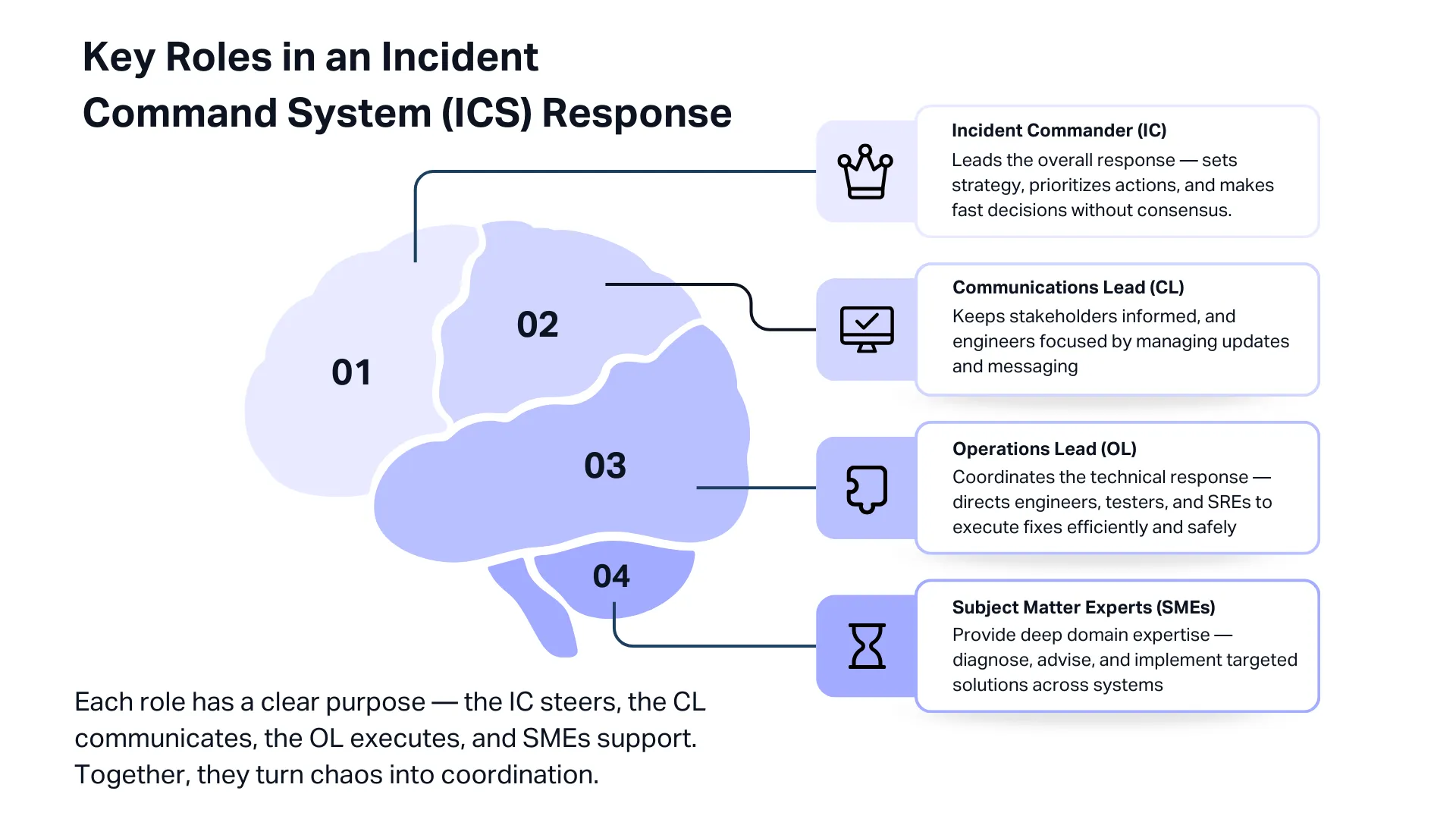
- Incident Commander (IC): Leads the entire crisis response. Decides priorities, coordinates teams, and ensures the right actions happen in the right order. The IC is often a senior engineering or QA leader who can make trade-offs quickly and speak confidently to executives.
- Communications Lead (CL): Owns all updates, internal and external. Keeps support, leadership, and customers informed with accurate and timely information. This frees engineers to focus on resolving the issue instead of constant messaging.
- Operations Lead (OL): Directs the technical responders. Coordinates developers, testers, SREs, and other specialists who are running diagnostics, applying patches, or performing rollbacks. The OL makes sure parallel workstreams do not conflict.
- Subject Matter Experts (SMEs): Specialists brought in as needed, such as database engineers, security staff, or QA leads. SMEs advise and investigate but do not run the incident.
Once an incident is detected and declared, the IC is appointed, and the team forms quickly.
They assess scope and impact, begin mitigation, and stabilise the system through hotfixes, rollbacks, feature flag changes, or capacity adjustments.
When service is restored, the team transitions into documentation and root cause analysis, which we will cover in Part 3 of this series.
A major AWS outage in October 2025 illustrates how ICS works in practice. AWS used an ICS-style crisis response, with an IC coordinating dozens of teams across networking, storage, and databases.
A Communications Lead provided frequent updates to internal executives and thousands of affected customers.
Multiple Operations Leads ran parallel workstreams: one focused on DNS failures, another on database recovery, and others on restarting services.
Despite the complexity of the 15-hour incident, the structured roles kept the response organised and transparent, helping preserve customer trust.
The takeaway is clear. Even small teams benefit from this structure. In a QA crisis, people naturally panic or focus too narrowly on their area. ICS forces a complete view of the incident.
War Room Protocols
Some incidents become too large for normal Slack threads or ticket updates.
When multiple systems fail, or customer impact grows quickly, you need a war room: a focused, real-time space where the right people align fast and work from the same information.
A war room should not be used for every incident. Common triggers include:
- Cross-team impact: Front-end, API, database, and DevOps all affected.
- High-severity issues: Any S1 and major S2 incidents.
- Security or data events: Engineering, infosec, legal, and comms must stay aligned.
- Executive visibility: Key customers or leadership are closely monitoring the incident.
Setting one up is simple. Create a clearly named channel, keep all communication there, and use one shared dashboard or incident doc so everyone sees the same data.
The Incident Commander runs the room, sets priorities, and keeps the discussion structured. Many teams use tools like PagerDuty or Atlassian to auto-create these rooms and log actions.
After resolution, hold a quick debrief to refine the process and update your playbook. A war room brings clarity, speed, and alignment at the exact moment teams normally scatter.
Used at the right time, it can cut hours off MTTR and turn a chaotic incident into a controlled, coordinated response.
Rapid Crisis Response Testing Strategies
In the middle of a crisis in QA, you often have no choice but to ship fixes quickly. The problem is that every change carries risk. A rushed patch can easily turn a bad situation into a worse one.
That is why rapid testing becomes your safety net. You need fast, reliable signals that tell you, “Yes, this fix is actually helping.”
Here is how teams do that when time is tight.
Start with Smoke Tests on the Critical Flows
As soon as a fix or mitigation is ready, run a quick smoke test on the flows that absolutely must work. Think: login, browse, add to cart, checkout, or payment confirmation.
For B2B products, it might be invoice creation or approval.
These tests should already be prepared, ready to run in minutes. They can be a small automated suite or simple manual spot checks.
Run Targeted Regression Around the Fix
Emergency fixes can have side effects, so test around the area you touched.
If you turned off a feature flag to stabilise the system, make sure the app behaves as expected with the flag off.
Automated regression suites are extremely useful here because they can give fast feedback without slowing the crisis response.
A short exploratory pass by a tester also helps. Many teams keep a “QA crisis regression” checklist: a small set of high-impact things you verify every time a hotfix goes out.
Validate Rollbacks Too
Sometimes the safest move is to roll back to the last known good version. But even a rollback needs testing.
Make sure error rates return to normal, transactions succeed again, and data is still consistent.
If the faulty release added any database migrations or configuration changes, check those as well. Rollback steps should include quick integrity checks and a couple of full transactions end-to-end.
Use Canary Releases When You Are Not Fully Confident
If you are unsure whether a fix will work, roll it out to a small percentage of users first. Watch what happens. If errors drop, great. If they spike, stop the rollout immediately.
Most modern systems support this through deployment pipelines or feature flags. It is one of the safest ways to test changes in a real environment without exposing everyone at once.
Lean on Feature Flags for Instant Relief
Feature flags can save you during a crisis in QA. If a new feature is causing problems, flipping it off can stabilise the system in seconds.
After disabling it, do a quick sanity check to make sure the app works correctly in that “reduced functionality” mode.
Of course, this only works if teams regularly test both flag-on and flag-off states before the crisis hits.
Check Performance Quickly When the Issue Is Load-Related
Some crises are caused by load, not logic. If you scale up resources or optimise a slow part of the system, validate quickly.
You can run a small load test with tools like JMeter or Gatling, or simply watch your APM dashboards for improvements in CPU, memory, error rates, and latency.
Incident teams often set up a special dashboard during the crisis that tracks the exact symptoms: checkout success rate, payment gateway errors, login failures, and so on.
Automated Testing Is Your Firefighting Gear
None of this works well if you do not have good automated tests and CI pipelines ready beforehand. In a crisis, there is no time to write new tests.
The teams that recover the fastest are the ones that can run meaningful automated checks within minutes.
Some organisations even keep a tiny production-safe smoke suite they can execute instantly.
Bring in External Testers When You Need Extra Eyes
During a QA crisis, your internal team is often fully consumed by debugging and shipping fixes.
Bringing in on-demand, managed crowdtesting can give you real-world exploratory coverage across devices, regions, and platforms.
This catches user-experience issues that automation might miss. The key is to have this relationship set up ahead of time.
Communication During Crisis
When a major incident hits, you are really managing two crises: the technical issue and the communication around it.
Engineers focus on debugging, but if communication stalls, confusion spreads fast.
So let’s break down how communication should work across the board inside your organisation, with your users, and across every channel you rely on during a crisis.
Internal Communication
Inside the organisation, silence is the worst thing you can offer. Leadership, support, and product teams need predictable updates, even if the update is simply, “No change yet.”
A simple cadence works well:
- Severity 1: every 30–60 minutes
- Severity 2: every 2–4 hours
- Severity 3–4: when milestones change or the issue is resolved
Each update should cover three things: what we know, what we are doing, and what happens next.
Many teams assign a dedicated Communications Lead so engineers can keep fixing instead of constantly explaining.
Use one official channel for updates, like a Slack “incident-updates” room or internal status page, so executives and teams hear accurate information from one place, not through DMs or rumours.
External Communication
When users are impacted, your public communication becomes the face of the incident.
The first message does not need to be perfect. It just needs to confirm awareness: “We are aware of an issue affecting checkout. We are investigating and will update again in 30 minutes.”
Even if nothing changes, update on schedule. A short “Still investigating, next update at 15:00 UTC” keeps users calm and prevents duplicate tickets.
A strong status update includes:
- Current state: Investigating, Identified, Monitoring, or Resolved
- Impact: which users, regions, or flows are affected
- Timeline: what has happened so far
- Next update time: commit to it and follow through
- Workarounds: if any exist
Slack’s 2022 outage is a classic example of this done well. Their honesty, even when fixes failed, strengthened trust rather than hurting it.
Keep Channels Consistent
Most companies communicate across multiple channels: status pages, X/Twitter, email, in-app banners, and support messages.
Consistency is critical. If one channel says “Resolved” while another says “Investigating,” you lose trust instantly.
Define one source of truth (usually the status page) and sync all other channels to it.
The best teams are not only fast at fixing issues, but they are clear and steady in how they talk about them.
Final Thoughts
In a QA crisis, the way your team responds matters just as much as the issue itself. When production breaks and the pressure hits, strong crisis response frameworks keep you steady.
Classifying severity early lets you pull in the right people fast, while an ICS structure and war room keep the response organized and focused.
Rapid tests, canary releases, rollbacks, and feature flags help ensure your fixes are safe.
You can’t prevent every incident, but you can respond in a way that contains damage, restores stability, and protects your reputation.
In Part 3, we’ll look at what happens after the crisis: blameless post-mortems, the five whys, and turning lessons into long-term improvements.
At Testlio, we support every phase of this cycle. As a fully managed, expert-led testing partner, we give your teams on-demand testing capacity across devices, platforms, and regions.
Whether you need deep exploratory testing before release or extra validation during a high-pressure incident, we help you catch issues early and respond with confidence.