Post-Crisis Analysis: Learning from the Fire (Part 3)
Once the immediate crisis has passed, the focus shifts from firefighting to reflection.


After preparation (Part 1) and response (Part 2), this stage helps QA and QE teams turn incidents into lasting improvements by documenting what happened, identifying root causes, and strengthening systems and culture.
In this part, we’ll cover how to run blameless postmortems, analyze systemic causes, track action items to completion, and strengthen long-term resilience.
The Blameless Postmortem
Once the crisis is over, the real value comes from learning what went wrong and how to make sure it doesn’t happen again.
That’s where postmortems come in. A postmortem is a structured, written account of an incident: what broke, why it broke, how it was fixed, and how to prevent it from happening again.
The most effective postmortems are blameless. Instead of asking “Who caused this?”, they ask “Why did our systems or processes allow this to happen?”
This mindset encourages honesty, surfaces deeper insights, and keeps the focus on improvement.
As Google’s SRE teams like to say: “The cost of failure is education.”
That said, not every incident needs a postmortem.
Teams should define clear triggers, such as downtime above a threshold, data loss, incidents requiring on-call escalation, SLA breaches, or events detected by monitoring but not alerting.
Stakeholders can also request one if an incident feels significant or exposes broader risks.
A good postmortem is clear, concise, and actionable. It typically includes:
- A brief summary of what happened and how it was resolved
- The impact, including affected users, duration, and any business fallout
- Root causes, both technical and process-related
- A timeline of key events from alert to resolution
- What went well, such as fast detection or solid coordination
- What went wrong, whether it was a missed alert or a delayed decision
- Action items with named owners and realistic deadlines
- Lessons learned, including broader takeaways worth sharing
Once it’s written, don’t let it gather dust. Share the postmortem widely, discuss it in a group review, and treat it as a learning moment.
Some teams even celebrate well-written postmortems as a sign of maturity and not a blame game.
Root Cause Analysis Techniques
Identifying what really caused a crisis is not always straightforward. The apparent failure might be only a symptom of deeper issues.
Root Cause Analysis (RCA) techniques help teams drill down beyond surface symptoms to identify the underlying causes that, if addressed, will prevent repeat incidents.
Here are three popular RCA methods:
5 Whys Method
The 5 Whys technique, originally developed at Toyota, is one of the simplest yet most powerful tools for root cause analysis.
The idea is straightforward: start with the problem and keep asking “Why?” until you reach the underlying issue you can actually fix.
Usually, five rounds of “why” are enough, but sometimes it might take fewer or more. You stop when the answer reveals a fixable root cause.
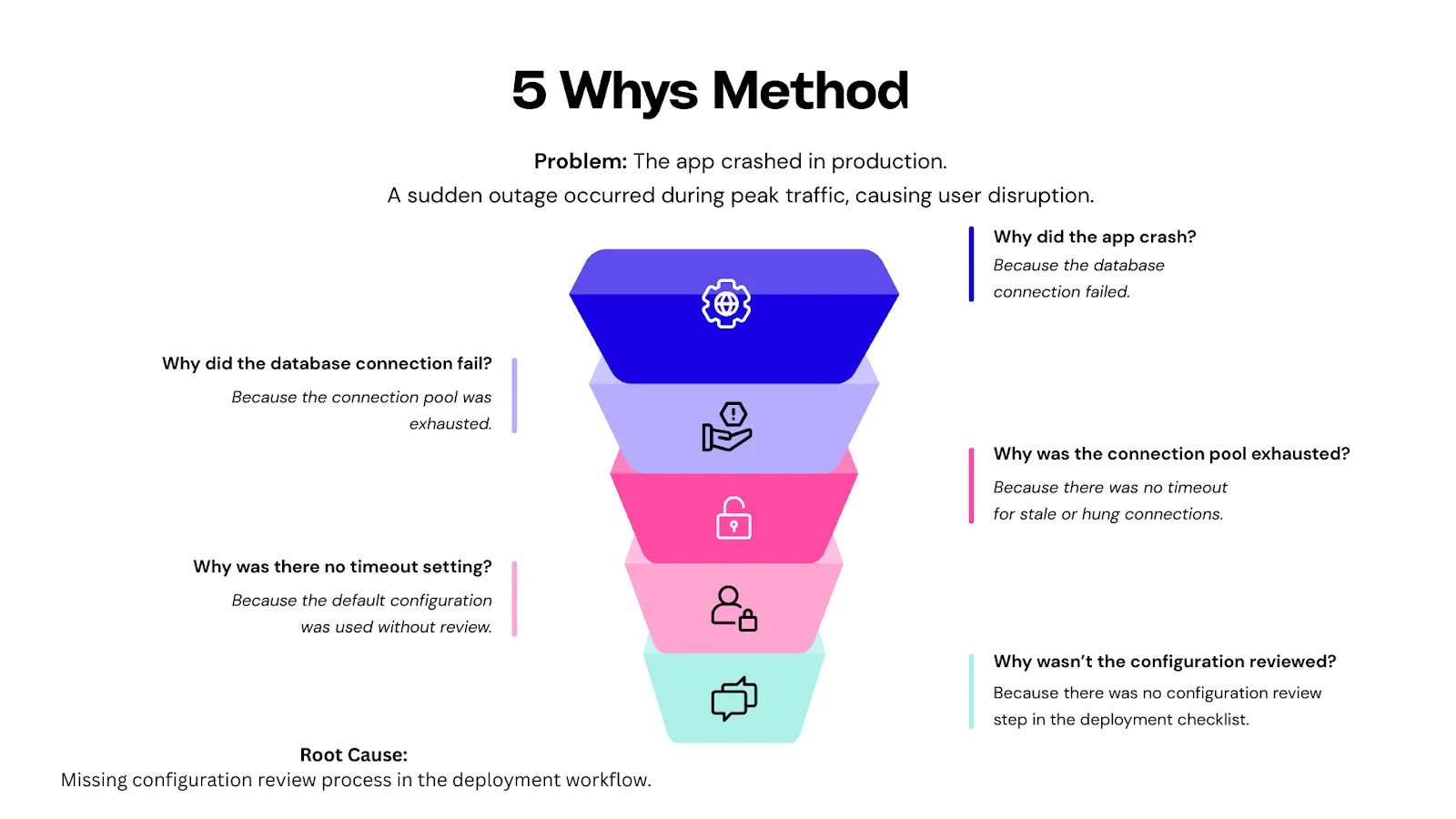
Action item: Add a mandatory config review to the release checklist
If you stop too early, at the database failure, you risk applying a superficial fix (like increasing the pool size) and missing the real issue.
The 5 Whys help teams stay curious, dig deeper, and uncover the process or system gaps that need fixing.
Fishbone Diagram (Ishikawa Cause-and-Effect)
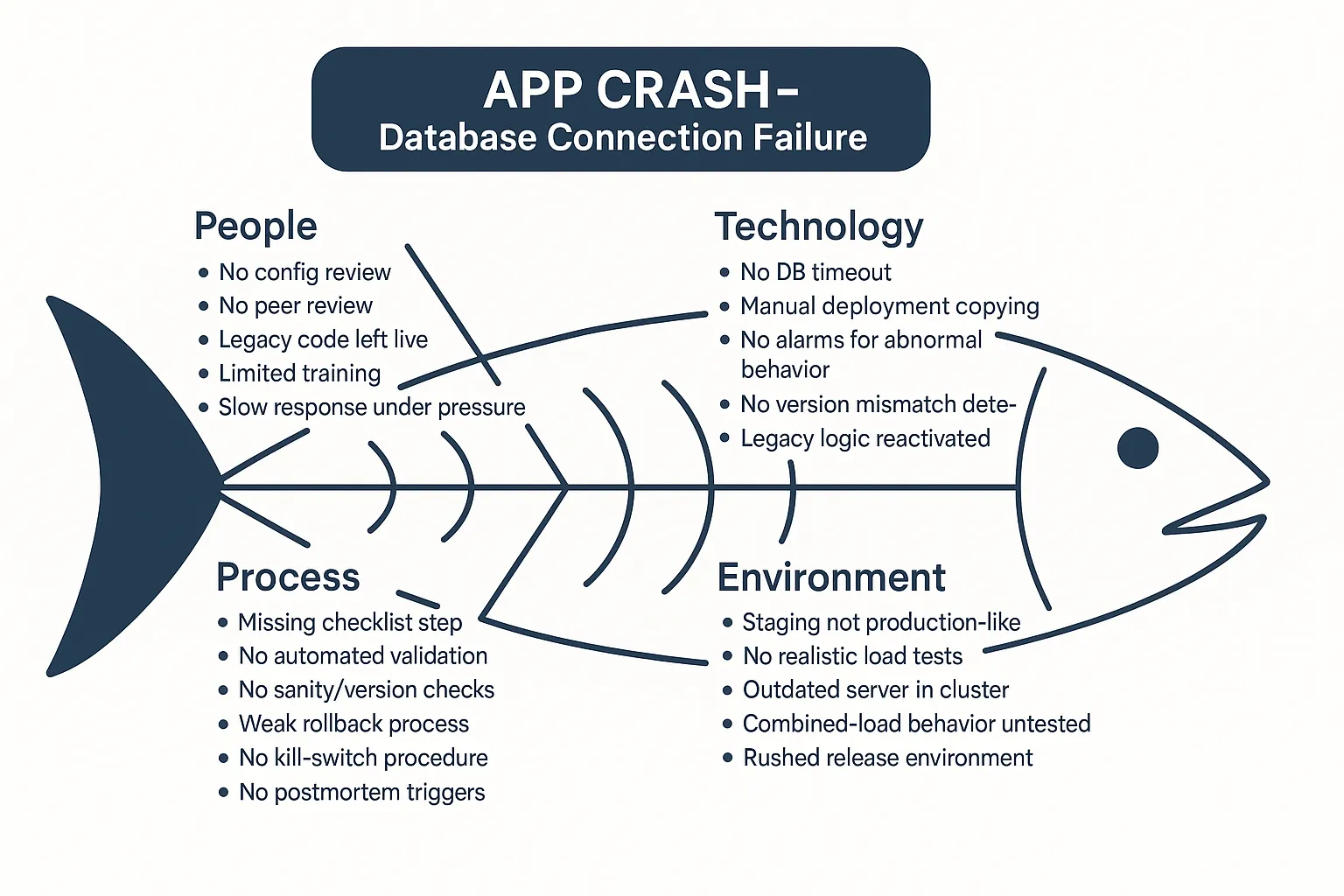
A Fishbone diagram helps teams map out all possible causes of an issue across different categories.
Visually, it looks like a fish skeleton: the problem is the “head,” and the “bones” represent categories of contributing factors.
Originally used in manufacturing, the categories have evolved for software teams. Instead of the 5 M’s, most QA and engineering teams use:
- People – Skill gaps, miscommunication, on-call fatigue
- Process – Missing review steps, unclear handoffs
- Technology – Service limits, dependency failures, outdated configs
- Environment – Firewall rules, staging/production drift, third-party outages
Let’s say a critical payment feature failed in production. Instead of jumping straight to a suspected bug, a Fishbone exercise forces you to ask: Was it a missed QA step?
A performance issue under load? A misconfigured firewall? Poor alerting?
That broader view helps uncover compounding factors rather than pinning it on one root cause.
Fault Tree Analysis
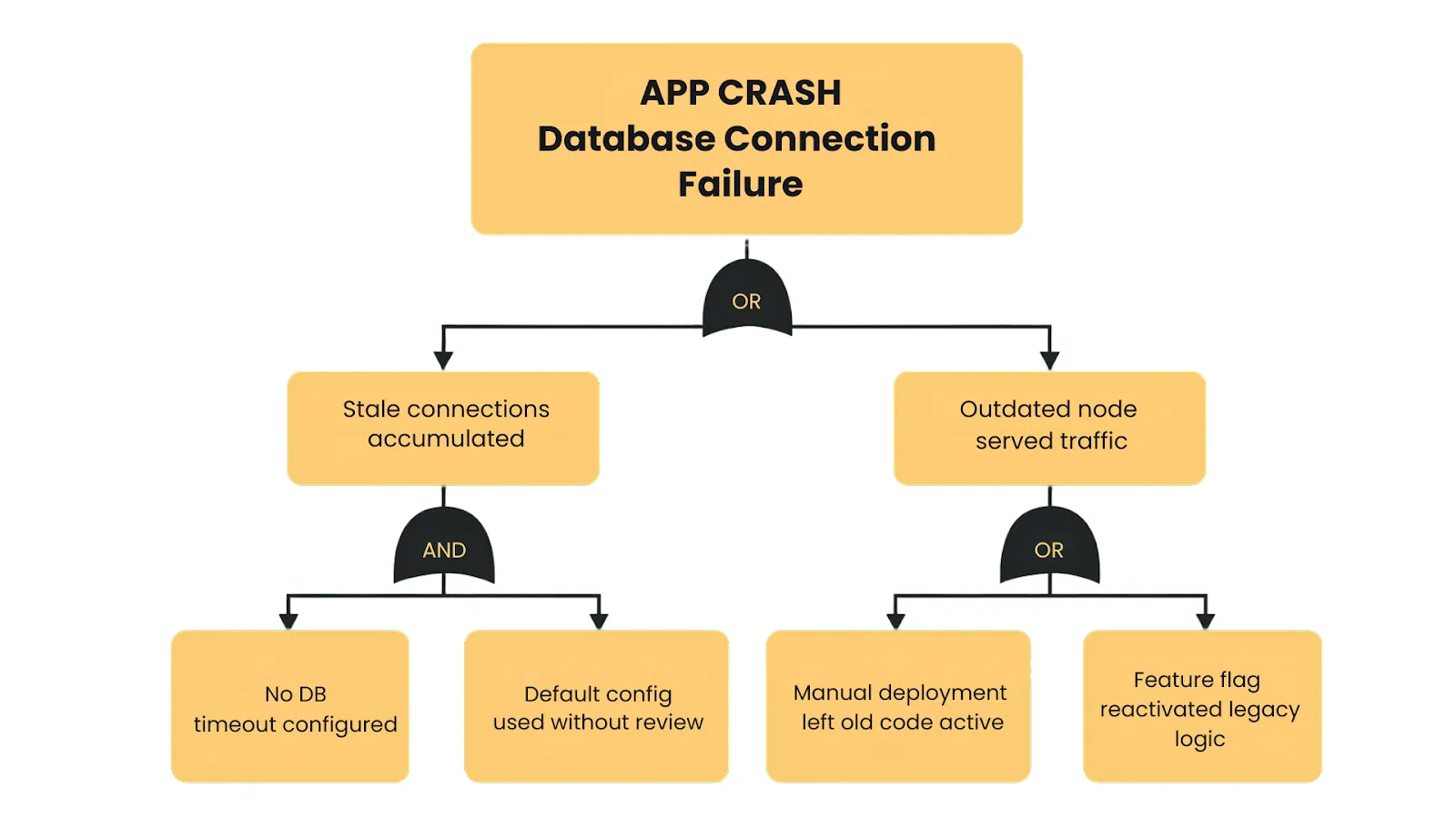
Fault Tree Analysis (FTA) is a structured, top-down method for uncovering how complex failures unfold.
These are plotted in a tree structure, using logical connectors:
- AND gates show where multiple failures must occur together to cause the issue.
Example: Service A fails, and failover for Service B fails → Outage. - OR gates represent scenarios in which any single failure is enough to cause the problem.
Example: Database outage caused by a power loss, a crash, or a network issue.
By diagramming the fault tree, you can visualize how seemingly unrelated failures interact to produce the crisis.
Action Item Tracking & Accountability
Uncovering root causes is only half the job. The other half is ensuring the right fixes actually get implemented.
After a crisis, teams often generate a solid list of action items, such as “add missing test,” “improve alerting,” or “update runbooks.” Still, without clear ownership and follow-through, these often fizzle out.
Real progress happens when postmortem insights turn into completed changes.
Here’s how high-performing teams make it happen:
- Assign individual owners: Every action item should have one clear owner. When responsibility is shared, execution slips.
- Set realistic deadlines: Give each item a defined timeline—30, 60, or 90 days—so nothing sits in limbo.
- Track in visible tools: Log actions in Jira, Trello, or a simple spreadsheet with owner, due date, and status. Clear labels make follow-up easier.
- Review regularly: Add quick progress checks to team meetings. For major incidents, use 30- and 90-day reviews to stay on track.
- Prioritize by risk: Tackle high-impact items first, so limited time goes toward the fixes that actually reduce future risk.
- Verify completion: Don’t just mark tasks as done—validate them. Simulate the fix to ensure it works when the next crisis hits.
A helpful benchmark is the percentage of action items completed within 90 days.
If only a third of tasks get done, something’s broken in your process. It could mean a lack of bandwidth or that incident reviews aren’t being taken seriously.
To ensure momentum, many companies keep a dedicated backlog of postmortem items and reserve sprint capacity to address them.
Typical action item types include:
- Process updates (e.g. improve release checklist)
- Tooling or automation (e.g. add a data scrubber)
- Training and drills (e.g. walk through failover)
- Documentation (e.g. improve runbooks)
- Monitoring/alerting changes
- Architecture improvements (e.g. remove single points of failure)
Tracking these over time can even reveal larger patterns like whether most incidents stem from process gaps, tooling limitations, or missed tests.
In the end, post-crisis action items are your insurance policy.
As one Google SRE article put it, if postmortem AIs are not closed out, you are implicitly agreeing that it’s acceptable to suffer the exact same outage again.
Building Organizational Resilience
Post-crisis fixes are just the start. The strongest QA and engineering teams treat every incident as fuel for long-term resilience
Here are five ways resilient organizations build lasting muscle:
Postmortem Reading Clubs
At Google and other engineering-driven companies, teams regularly review notable incidents, both internal and external.
These “reading clubs” normalize discussing failure, foster cross-team learning, and give newer team members valuable context.
You can avoid the same traps by reviewing outages or cloud incidents in another organization.
Wheel of Misfortune and Game Days
Google’s “Wheel of Misfortune” turns incident response into practice drills.
Teams reenact real past outages (sometimes randomly drawn) in tabletop simulations to improve diagnosis, communication, and response under pressure.
Some orgs go further with Game Days, simulating real system failures in staging to see how teams and tooling hold up under pressure.
Chaos Engineering
Netflix made this famous with Chaos Monkey, Chaos Kong, and other “Simian Army” tools that randomly kill services or simulate region-wide failures.
The goal: proactively test how systems respond under stress.
Chaos engineering teams identify brittle dependencies, validate failures, and design for graceful degradation before users feel the impact.
Runbook and Incident Knowledge Bases
Mature orgs like Google maintain centralized, tagged repositories of postmortems and operational playbooks.
After each incident, runbooks are updated with lessons learned. Teams analyze trends over time.
This shared institutional memory shortens onboarding, informs planning, and avoids repeating past failures.
A Culture That Learns from Failure
Resilient teams treat mistakes as learning opportunities.
Leadership invests in preventive work and values metrics such as mean time to recovery and postmortem action-item completion.
Teams that treat incidents as learning opportunities become faster, smarter, and more adaptable.
As one CTO put it: “Don’t waste a good crisis—use it to build better engineering.”
Real-World Lessons – Learning from Major QA/QE Crises
Some of the most valuable lessons come from studying how other organizations handled quality crises.
Below, we look at three famous incidents. Each case study includes a brief recap of the crisis, an analysis of what went wrong, and the key QA/QE lessons we can draw from it.
Case Study 1: Knight Capital (2012) – The $440 Million Bug
When Knight Capital pushed a trading update on August 1, 2012, they unknowingly triggered one of the costliest software failures in history.
Minutes after the market opened, their systems began firing off unintended trades at high velocity.
By the time engineers managed to stop it, the firm had lost about $440 million in 45 minutes and was forced into an emergency bailout.
The cause wasn’t an elusive bug. It was a stack of preventable operational and QA failures.
One of Knight’s eight production servers never received the new release and was still running a long-retired block of code called Power Peg.
A configuration flag in the new deployment accidentally reactivated that legacy logic, but only on the one server left behind.
With no automated deployment checks, no version validation, and no cluster-wide sanity tests, the mismatch went unnoticed.
When trading began, the outdated server executed its old logic at full speed. There was no kill-switch, no circuit breaker, and no guardrails to contain the blast radius.
In the scramble to fix it, engineers attempted a rollback and inadvertently spread the faulty behavior to all eight servers, amplifying the damage.
Investigators later described Knight’s release practices as having “multiple points of failure,” turning a simple oversight into a near-bankrupting disaster.
Key QA/QE lessons:
- Remove dead code; dormant logic can be reactivated unexpectedly.
- Automate deployments with verification checks across all nodes.
- Add sanity checks and circuit breakers for high-risk operations.
- Require peer review for critical releases.
- Maintain a tested kill-switch for emergency shutdowns.
- Test full workflows in production-like environments with real configuration.
As one analysis put it, “A single undeployed server with old code cost Knight Capital nearly half a billion dollars.”
Knight Capital didn’t fall to a complex bug, but it fell to weak operational discipline.
For QA leaders, it’s a clear reminder that reliability depends as much on process rigor as it does on good engineering.
Case Study 2: HealthCare.gov Launch (2013) – When QA Is Overruled
When HealthCare.gov launched on October 1, 2013, it was meant to be a landmark moment. Instead, millions tried to sign up, and almost none could.
Pages crashed, forms broke, and more than 90% of users failed to complete an application in the first weeks.
This wasn’t a one-off glitch. It was the predictable outcome of releasing a massive system without proper testing or QA authority. The core problems were organizational, not technical.
End-to-end testing across registration, identity checks, eligibility, and enrollment happened for the first time two weeks before launch.
Months of planned integration testing were squeezed into days, and critical failures surfaced far too late.
With more than 55 contractors involved, no single QA or integration owner had the authority to declare the system “not ready.”
Each vendor tested their own component in isolation, but when combined at scale, workflows collapsed instantly.
Even worse, QA warnings were raised but ignored. Internal tests showed the site couldn’t handle a few hundred concurrent users, yet leadership proceeded because the political launch date was fixed.
Developers later admitted they knew the system wasn’t production-ready — they simply lacked the power to stop the rollout.
Late feature changes added fuel to the fire. A last-minute requirement forcing users to create an account before browsing plans overloaded the registration system and pushed already fragile components past their limits.
And because the platform depended on a complex data hub connecting federal and state systems, under-tested integrations became bottlenecks and failure points the moment traffic hit.
HealthCare.gov didn’t fail because of one defect; it failed because quality didn’t have time, ownership, or authority. The result was a beta-level system deployed to millions.
Key QA/QE lessons:
- QA needs real authority to halt a launch when critical defects remain.
- Large, distributed systems require early, extensive end-to-end testing.
- A code freeze before launch is essential; late changes destroy test windows.
- Test entire user journeys, not isolated components.
- Escalation paths for quality risks must be clear and respected.
- Load-test in production-like environments or expect real users to be your testers.
As many analysts noted afterward: “Testing isn’t just technical — it’s organizational.” HealthCare.gov showed what happens when QA’s voice is present but powerless.
Case Study 3: AWS US-EAST-1 Outage (2025) – When Automation Fails
On October 20, 2025, AWS suffered a fifteen-hour outage in its largest region, US-EAST-1—an incident that disrupted huge portions of the internet.
Zoom, Teams, Slack, Atlassian, Snapchat, Coinbase, and even Amazon’s internal services slowed or went dark. To many users, it looked like half the internet had simply failed.
AWS’s postmortem traced the collapse to a subtle race condition inside the DNS management system that supports DynamoDB.
A tiny timing drift between two automated DNS “Enactors” created a perfect storm: one applied an outdated DNS plan while the other cleaned up what it believed were stale records. In reality, it deleted the active DNS entries for the entire regional DynamoDB endpoint.
Once those records disappeared, anything in US-EAST-1 that relied on DynamoDB instantly broke. Applications couldn’t resolve hostnames.
AWS identity and control-plane services stalled. EC2 launches failed, Lambda invocations backed up, and dependent systems began cascading into failure.
It started with the foundational automation that keeps AWS running.
Automation then made things worse. The same self-healing system designed to increase reliability amplified the failure by repeatedly reinforcing the bad DNS state.
Recovery required engineers to manually rebuild records, patch automation logic, and bring services back online slowly to avoid thundering-herd overload.
Even after the root fix, the region took hours to stabilize.
Key QA/QE lessons:
- Test automation failure modes, not just core logic. If your system relies on auto-healing, failover, or reconciliation loops, test what happens when they lag, conflict, or trigger out of order.
- Use chaos engineering to explore system-level weaknesses. Region-wide failures aren’t theoretical. Controlled chaos tests can reveal dependency blind spots and brittle fallback logic.
- Simulate region-level outages not just single-node failures. Multi-AZ isn’t protection against control-plane bugs. DR drills should include “entire region unavailable” scenarios.
- Map dependencies clearly. Many teams discovered they relied on DynamoDB indirectly. QA should test how systems behave when upstream services throttled, stalled, or vanished.
- Design for graceful degradation. Instead of full crashes, systems should fall back to cached data, reduced functionality, or safe limits when a core dependency disappears.
- Train teams through drills. Companies that practiced multi-region failover recovered quickly; those that hadn’t struggled for hours.
The broader takeaway is universal: even the most mature architectures hide failure paths you can’t predict.
The only way to find them is to test deliberately.
Final Thoughts
Each of these crises shows the same truth: failures will happen, but the scale of the damage depends on how well we prepare, how quickly we respond, and how deeply we learn from what happened.
When you look at the events together, the pattern is clear: resilience isn’t luck. It comes from disciplined processes, thoughtful testing, and the willingness to treat every incident as a source of insight.
This is what post-crisis analysis is really about.
By examining what broke, why it broke, and how to prevent it from happening again, QA and QE teams turn painful moments into long-term strength.
That learning loop is what separates teams that repeat the same fires from those that steadily reduce them.
In Part 4, we will bring everything together and lay out how to build a complete Crisis Management Strategy for QA and QE teams.
As you strengthen your own crisis management practices, remember that you don’t need to tackle it alone.
Testlio’s managed software testing services can extend your QA capabilities with global expert testers, rigorous pre-release coverage, and real-world scenario validation that is hard to replicate in-house.
Partner with Testlio to reduce risk, ship with assurance, and build the kind of resilience that prevents crises before they ever reach production.